How Do I Send and Receive Faxes with AFAX?

How do I Send a Fax?

Sending a fax with AFAX is simple and works much like sending an email.

You may send faxes either:

  • directly from your email application, or
  • through the AFAX Secure Portal.

Sending a Fax Using Email-to-Fax

1. Open Your Email Application

Use your preferred email service or application, such as:

  • Outlook
  • Gmail
  • Yahoo Mail
  • Hotmail
  • Apple Mail

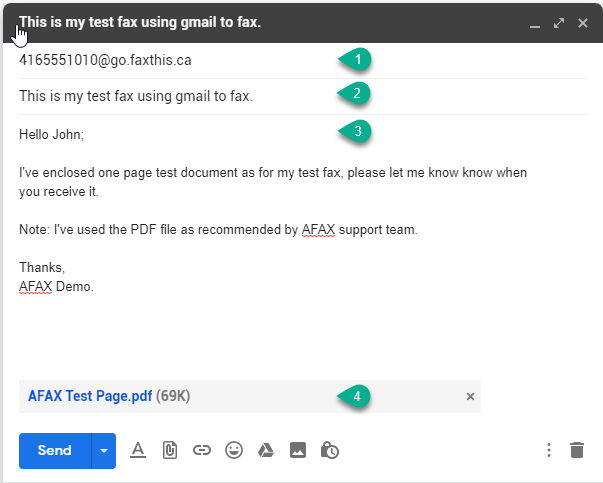
2. Enter the Destination Fax Number

In the To field, enter the recipient’s fax number followed by:

@go.faxthis.ca

Example:

[email protected]

For international fax transmissions, include the country code.

International Example:

[email protected]


3. Enter the Fax Subject

The email subject line will be used as the fax subject.


4. Enter Your Message

Type your message in the body of the email.

This content may appear on the AFAX cover page, depending on your selected settings.


5. Attach Your Documents

Attach the document(s) you would like to fax.

AFAX supports multiple file formats; however, PDF format is recommended for the best compatibility and fax quality.


6. Send Your Fax

Click Send and AFAX will securely process and deliver your email as a fax transmission.


Sending a Fax Through the AFAX Secure Portal

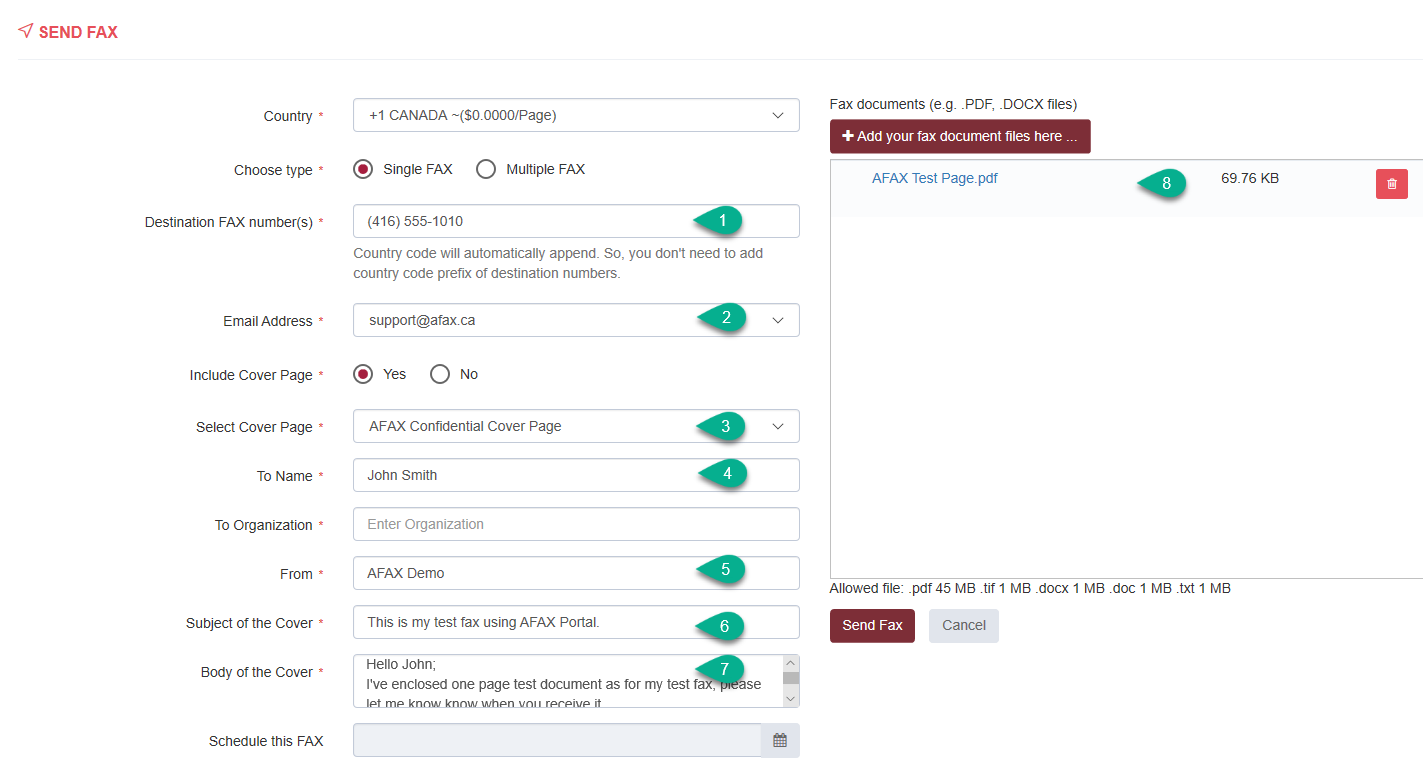
You may also send faxes directly through the AFAX Secure Portal, where you can:

  • upload documents securely
  • manage contacts
  • select cover page options
  • send to single or multiple recipients
  • track fax delivery status

The AFAX Secure Portal provides additional fax management and security features designed for both individual and business users.

How do I Receive Faxes with AFAX?

AFAX allows you to receive faxes securely without the need for a traditional fax machine, dedicated phone line, or fax server.

Incoming faxes are processed through the AFAX cloud platform and delivered directly to your designated email address(es), allowing you to access your faxes from virtually anywhere.


Secure Fax Delivery and Storage

In addition to email delivery, AFAX also provides secure online storage for your fax documents through the AFAX Secure Portal.

Your received fax content is encrypted and securely stored, allowing authorized users to:

  • view fax details and transmission information
  • preview fax content
  • download fax documents
  • manage and organize received faxes
  • securely delete fax records when needed

Faxes may be accessed from:

  • desktop computers
  • laptops
  • tablets
  • mobile devices

Flexible Fax Number Options

AFAX offers:

  • Local fax numbers in select Canadian cities
  • Toll-Free fax numbers across Canada and the United States

Business and Integration Options

If your organization requires custom integrations with:

  • business applications
  • document management systems
  • fax servers
  • enterprise workflows

please contact AFAX Support for additional information regarding integration and enterprise solutions.

Can I assign separate AFAX numbers to different individuals or departments?

Absolutely. One of the key benefits of the AFAX Platform is the ability to assign dedicated fax numbers to individual users, departments, or business functions within your organization.

This allows fax communications to remain more organized, secure, and private — similar to how individual email addresses are used within a business environment.

Separate fax numbers may be assigned for:

  • individual staff members
  • departments
  • branch locations
  • clinics or offices
  • specialized business functions

Available Across Multiple Plans

Additional fax numbers may be added to:

  • General Plans
  • Professional Plans
  • Healthcare Plans
  • Enterprise Solutions

An additional monthly charge may apply for each extra fax number associated with your account.

At present, the standard monthly fee for an additional fax number is:

$4.99 per month per additional fax number


Additional Information

If your organization requires:

  • multiple departments
  • larger user groups
  • custom routing
  • enterprise integrations
  • advanced fax management

please contact AFAX Support for additional options and customized solutions.

