What do I need to get started with AFAX?

Getting Started with AFAX

Getting started with AFAX is simple and does not require any specialized fax hardware, dedicated phone lines, or complex software installations.

To use the AFAX service, you only need:

  • An internet connection
  • A valid email address (personal or business)
  • An active AFAX account

That’s it.

If you already use a:

  • desktop computer
  • laptop
  • smartphone
  • tablet device

you can immediately begin sending and receiving faxes securely using the AFAX Platform.


No Traditional Fax Machine Required

AFAX is a modern cloud-based fax solution that eliminates the need for:

  • traditional fax machines
  • analog phone lines
  • fax modems
  • toner or paper supplies
  • on-premise fax servers

Instead, your fax communications are processed securely through the AFAX cloud infrastructure and delivered digitally to your email address or AFAX Secure Portal.


Send and Receive Faxes Anywhere

With AFAX, you can securely:

  • send faxes by email
  • receive faxes by email
  • send faxes through the AFAX Secure Portal
  • manage your fax history online
  • access your fax documents remotely

Whether you are working:

  • from the office
  • remotely
  • from home
  • while traveling

your fax communications remain accessible across your devices.


Secure Cloud Faxing Platform

AFAX provides a secure online fax platform designed for:

  • individuals
  • businesses
  • healthcare providers
  • professional offices
  • enterprise organizations

Your fax documents are securely transmitted and stored using encrypted systems and secure access controls.

Additional security features include:

  • secure online portal access
  • encrypted fax storage
  • multiple user management
  • Two-Factor Authentication (2FA)
  • secure document access from authorized devices

Flexible Faxing Options

AFAX supports:

  • local fax numbers in select Canadian cities
  • toll-free fax numbers across Canada and the United States
  • multiple users under the same account
  • department-specific fax numbers
  • email-to-fax functionality
  • multi-recipient faxing
  • secure online fax management

Designed for Modern Business Communication

AFAX is designed to simplify fax communications while helping organizations reduce:

  • hardware costs
  • maintenance expenses
  • paper usage
  • infrastructure complexity

The platform integrates easily into modern business workflows and supports both personal and professional faxing requirements.


Start Faxing in Minutes

Once your AFAX account is activated, you can begin sending and receiving faxes within minutes using your existing devices and email applications.

No additional software installation is required for standard email-to-fax functionality.

Can I Send and Receive Faxes using my Smartphone or Tablet?

Yes. AFAX allows you to send and receive faxes from virtually anywhere using your smartphone, tablet, laptop, or desktop computer.

Most modern mobile devices include built-in email applications that can easily connect to your existing personal or corporate email account, allowing you to use AFAX without installing complicated software or dedicated fax applications.

AFAX is compatible with:

  • iPhone® and iPad®
  • Android™ smartphones and tablets
  • Windows® and Mac® computers
  • most modern email platforms and mobile email applications

Simple and Easy to Use

There is no complicated setup process or additional hardware required.

If you know how to send an email, you already know how to send a fax using AFAX.

Simply:

  • compose an email
  • attach your documents
  • enter the destination fax number
  • send your fax securely through AFAX

Send and Receive Faxes Anywhere

Using AFAX, you can:

  • send faxes while traveling
  • receive fax notifications instantly
  • access fax documents remotely
  • securely manage your fax communications on the go

As long as you have internet access and email connectivity, your faxes remain accessible wherever your business takes you.


Secure Mobile Faxing

AFAX securely processes your fax transmissions through our cloud-based fax platform and delivers received faxes directly to your email address and AFAX Secure Portal.

Additional security features include:

  • encrypted fax storage
  • secure online access
  • Two-Factor Authentication (2FA)
  • controlled user access

 Additional Information

You may also send and manage faxes directly through the AFAX Secure Portal using your mobile browser without requiring additional software installation.

Simple user guides for sending faxes from mobile devices such as iPhone®, iPad®, and Android™ devices are also available within our support and FAQ sections.

Can I Forward my Existing Fax Number to my AFAX Number?

Yes. Forwarding an existing fax number to your AFAX number is a common and recommended setup for many businesses transitioning from traditional fax services to cloud-based faxing.

This approach allows you to continue using your existing fax number while benefiting from the flexibility and convenience of the AFAX Platform.


How Fax Forwarding Works

To forward your existing fax number to AFAX, your current telephone or fax service provider must enable a:

Call Forwarding feature

on your existing fax line.

Once call forwarding has been activated, all incoming fax calls to your existing fax number can be automatically redirected to your assigned AFAX fax number (DID).


Typical Use Cases

Many customers use this setup when:

  • transitioning from traditional fax machines
  • migrating from analog or VoIP fax lines
  • avoiding immediate fax number porting
  • maintaining business continuity during migration
  • keeping a backup fax line available

In many cases, your original fax line may still be used for outgoing fax transmissions or retained as a backup line while incoming faxes are routed through AFAX.


 Important Information

Availability and functionality of call forwarding services may vary depending on your:

  • telephone provider
  • fax line type
  • VoIP configuration
  • business service plan

We recommend contacting your existing telephone or fax service provider directly to:

  • confirm call forwarding availability
  • review any applicable charges
  • receive provider-specific setup instructions

Additional Assistance

If you require assistance configuring fax forwarding or planning a migration to AFAX, please contact AFAX Support. Our technical team will be happy to assist you with the setup process and recommend the most suitable solution for your environment.

Can I Port my Existing Fax or Telephone Number to AFAX?

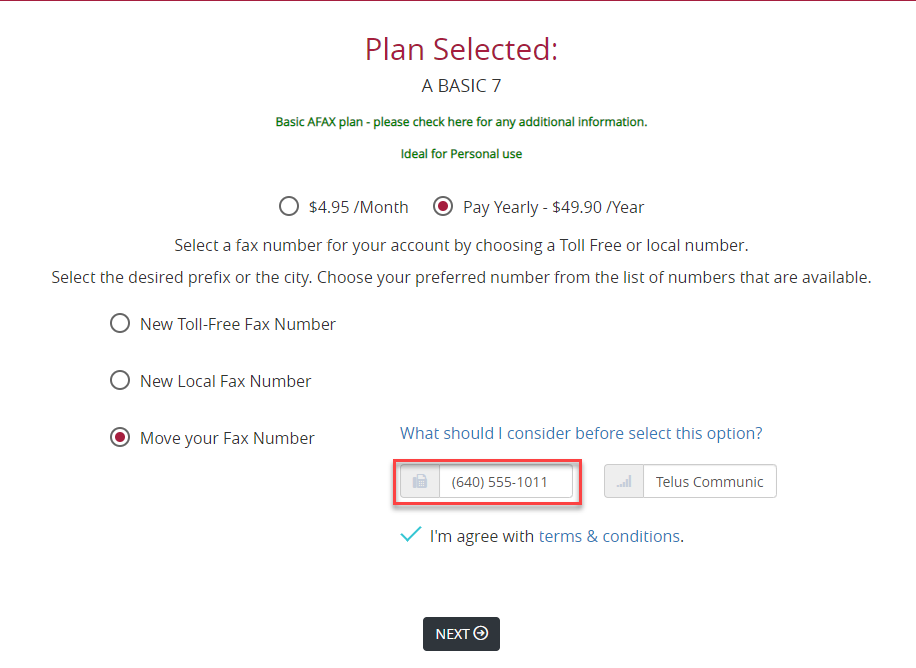
Yes. AFAX supports Local Number Portability (LNP), allowing you to move your existing fax or telephone number to the AFAX Platform in many cases.

This process allows you to continue using your current number while benefiting from AFAX cloud-based fax services.

In most standard situations, there is no additional charge for submitting a porting request.
 

What Is Local Number Portability (LNP)?

Local Number Portability (LNP) allows customers to keep their existing telephone or fax number when changing service providers or carriers.

This helps businesses avoid:

  • changing published fax numbers
  • updating stationery or marketing materials
  • notifying clients of a new fax number

Which Numbers Can Be Ported to AFAX?

In many cases, you may port:

  • existing fax numbers
  • business telephone numbers
  • additional business lines
  • certain mobile or wireless numbers
  • VoIP-based numbers

Port availability depends on:

  • geographic location
  • current carrier support
  • number ownership status
  • regulatory and carrier restrictions

When Can I Request Number Porting?

You may request number porting:

  • during the AFAX sign-up process
  • or at any time after your account has been activated

If you have multiple numbers or more advanced requirements, please contact AFAX Support for additional guidance.


Important Requirements Before Porting

Before submitting your request:

1. Keep Your Existing Service Active

Your current fax or telephone service must remain active during the porting process.

Cancelling your service before the port is completed may result in loss of the number.


2. Verify Internet Line Dependencies

If your telephone number is also being used for:

  • DSL Internet
  • ADSL Internet
  • bundled internet services

additional review may be required before porting can proceed.

If you are unsure, please contact your current service provider or AFAX Support for assistance.


3. Provide Existing Carrier Information

During the request process, you will be asked to provide:

  • your existing fax or telephone number
  • current carrier information
  • account details associated with the number

Accurate information helps avoid delays and porting rejections.


Can All Numbers Be Ported?

No. While many numbers can be transferred, certain restrictions may prevent successful porting.

Examples may include:

  • inactive numbers
  • unsupported geographic regions
  • pager services
  • certain carrier restrictions
  • numbers associated with internet service dependencies

Port eligibility is ultimately subject to carrier and regulatory approval.


Should I Cancel My Existing Service Before Porting?

No.

We strongly recommend that you do NOT cancel your existing service until the porting process has been completed successfully.

Please review any existing contracts or agreements with your current provider, as early termination fees or outstanding balances may still apply.

AFAX is not responsible for penalties, fees, or contractual obligations associated with your previous provider.


Can I Keep My Number If I Move to Another City?

Yes. One of the advantages of cloud faxing is location flexibility.

For example, you may port a Toronto fax number to AFAX and continue receiving your faxes while operating from another city or province.


Can I Port My Number Away from AFAX Later?

Yes. In most cases, you may request to port your number to another eligible service provider in the future, provided:

  • your account remains in good standing
  • there are no outstanding balances or contractual restrictions

 Important Note Regarding AFAX-Owned Numbers

Fax numbers originally assigned and owned by the AFAX Platform may not be eligible for external porting requests.

AFAX reserves the right to approve or reject porting requests for numbers provisioned directly through the AFAX service.