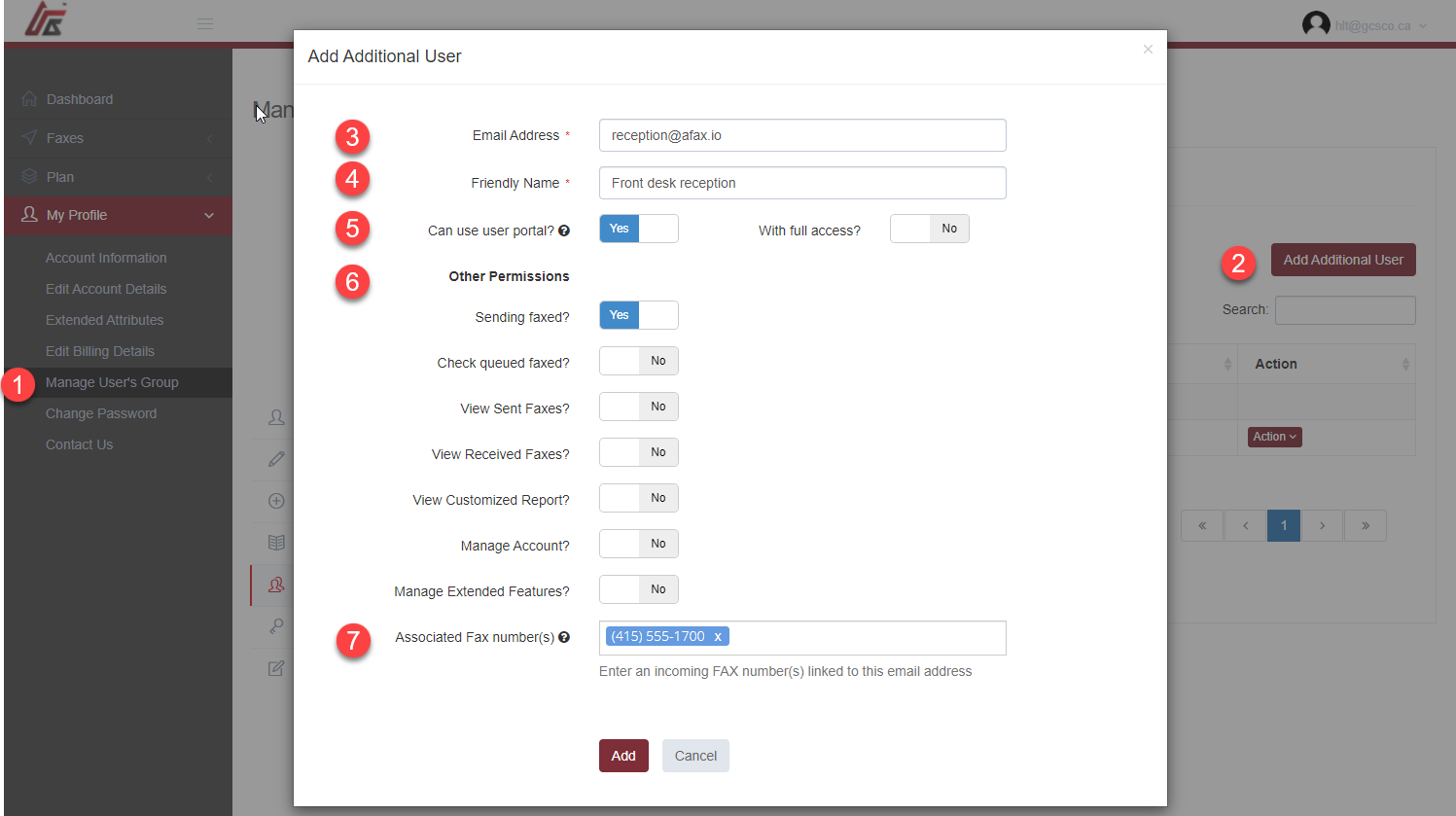
AFAX allows account administrators to securely add and manage additional users within the same account environment.
This feature is ideal for:
- staff members
- departments
- assistants
- remote employees
- multi-user business environments
Additional users can be configured with customized permissions and access controls based on your organization’s operational requirements.
Adding a New User
To add a new user to your AFAX account, you must first sign in using the:
Primary Account (Administrator Account)
Then follow these steps:
1. Open User Management
Navigate to:
My Profile → Manage User’s Group
2. Select “Add Additional User”
Click:
Add Additional User
to create a new user profile.
3. Enter the User’s Email Address
Provide the email address associated with the new user account.
This email address may also be used for:
- Email-to-Fax access
- fax notifications
- secure login access
4. Assign a Friendly Name
Enter a display or friendly name to help identify the user within your organization.
Examples may include:
- Reception
- Billing Department
- Dr. Smith
- Accounting Team
5. Configure Portal Access Permissions
You may grant:
- limited portal access
- customized permissions
- or full administrative access
depending on the user’s role and responsibilities.
Regardless of assigned access permissions, users will only have access to their own fax documents and related fax activity. Only authorized administrator accounts and the primary account holder will have full visibility across all fax content within the AFAX Portal.
Available User Access Controls
Individual permissions may be configured for each user, including:
Faxing Permissions
- Send Faxes
- View Queued Faxes
- View Sent Faxes
- View Received Faxes
Reporting and Account Access
- View Customized Reports
- Manage Account Settings
- Manage Extended Features
Associated Fax Numbers
If your account includes multiple fax numbers, you may assign specific fax numbers to individual users or departments for sending and receiving fax communications.
This helps organizations maintain:
- department separation
- user-specific fax routing
- improved privacy
- operational organization
 Additional Information
Most AFAX plans include a predefined number of additional users at no extra cost. Additional user licenses or extended user access may require plan upgrades or additional monthly charges depending on your selected subscription.
If you require assistance configuring multi-user access or department-based fax management, please contact AFAX Support for additional guidance and enterprise options.